Workspaces
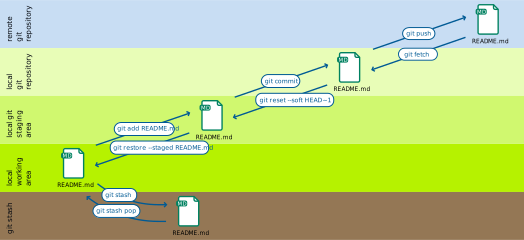
Git manages multiple locations or workspaces where files are stored:
- local working copy
contains files and folders that can be edited normally.
- staging area
contains changes to files that are scheduled for writing into the version history.
- local repository
contains the entire history of all files in the project.
- remote repository
also contains the entire history, but is stored on a remote server.
- stash
contains changes that are temporarily stored somewhere else to move them out of the way.
Basic Git commands
The following basic Git commands move changes between these workspaces.
git addadds files from the working directory to the staging area.
git reset HEADrestores a file in the work area from the stage area.
git stashmoves files from the workspace to a stash.
git stash popbrings files from the stash to the work area.
git commitwrites changes from the staging area to the local repository.
git pullcopies changes from the remote to the local repository and updates the work area.
git pushcopies changes from the local repository to the remote repository.
git push -u UPSTREAM BRANCHNAME-u(long form--set-upstream)allows to specify the remote repository and a branch in it.
UPSTREAMthe name of the remote repository, typically
origin.BRANCHNAMEthe name of a branch in the remote repository, typically the same as in the local repository.